

Operator Connect for Microsoft Teams
Operator Connect.Calling In Teams.
Carrier-grade PSTN calling.
Add Canadian phone calling inside your collaboration app, managed from one Smart Manager portal.
Get startedEvery weekday, our network carries
Across 400+ communities in Canada · Iristel network data
Works with
Operator Connect
What is Operator Connect for Microsoft Teams?
Operator Connect makes Iristel a Microsoft-certified operator for your tenant. Numbers and users are set up right in the Microsoft Teams Admin Center, over a 1:1 connection through Azure Peering Services. There are no session border controllers, no third-party hardware, and no Direct Routing to maintain. Smart Manager then handles the admin work the Teams Admin Center does not cover. That ranges from resource accounts and auto attendants to licensing visibility and call diagnostics.
Get started
Features
What are the key features of Operator Connect?

Seamless Integration
Phone service that works smoothly with Microsoft Teams. Set up users and assign numbers right in the Teams Admin Center.

One Portal to Run It
Iristel Smart Manager adds guided setup, call flow management, and diagnostics on top of Operator Connect.

Inclusive Calls
Worry-free calling with inclusive calls to Canada and the Continental US. No surprises on your bill.

Enhanced Support
Carrier-grade reliability, backed by our direct link to Microsoft.
Why Iristel Operator Connect
Connectivity is table stakes. Management is the difference.
Every Operator Connect carrier can put phone numbers into Microsoft Teams. Iristel adds Smart Manager. It's one portal that handles everything the Teams Admin Center leaves behind. That includes guided setup, auto attendants and call queues, licensing visibility, call diagnostics, and secure delegated admin.
6-Minute Deployment
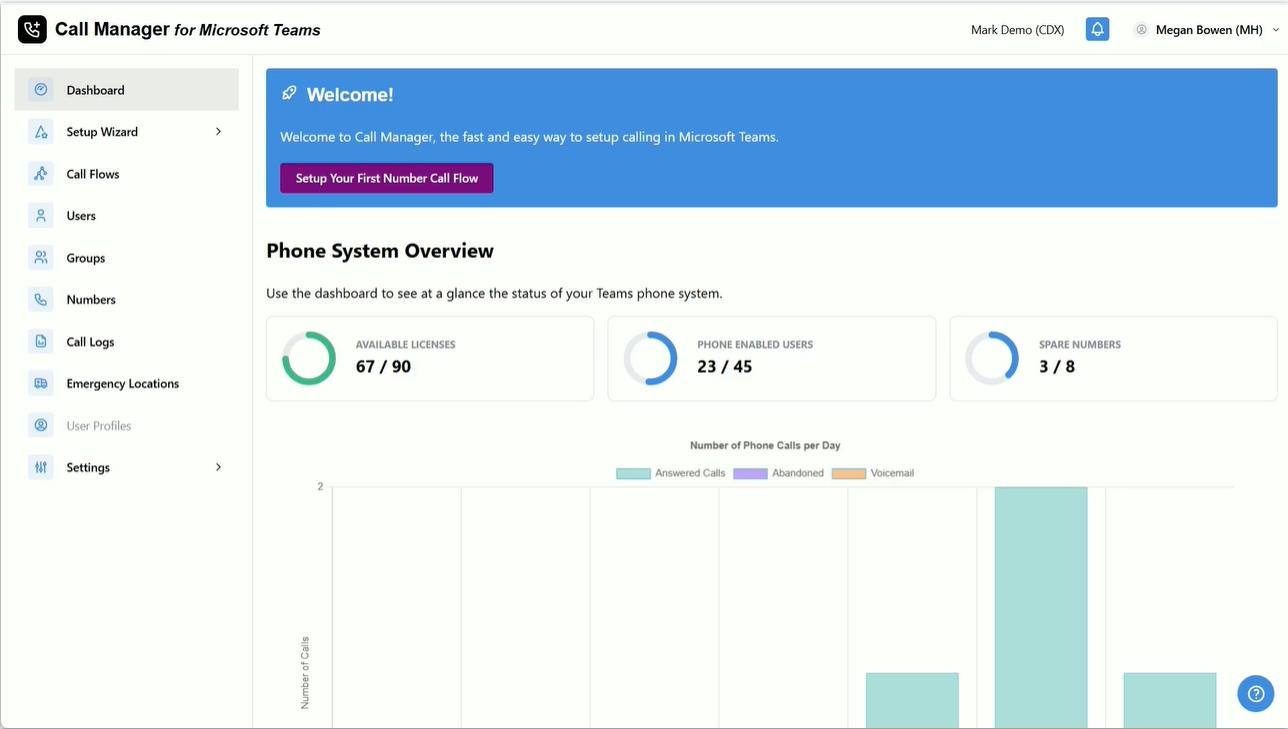
Deploy Teams Phone environments in as little as 6 minutes with the guided setup wizard.
Single Interface
Manage users, numbers, and call flows from a single intuitive, PBX-style interface.
Reporting and Diagnostics
Access reporting and diagnostics from one dashboard, with system health and performance at a glance.
Secure Remote Management
Manage remotely and securely, without full access to the Microsoft tenant.
Multi-Tenant
Support multiple Teams Phone environments efficiently from one dashboard. It's ideal for MSPs and organizations with more than one site.
Centralized Visibility
See active users, available numbers, licensing status, and call activity in real time.
Why Iristel
Iristel is a Trusted Leader in Canadian Telecom

Secure Geo-Redundant Network

Enterprise-Grade VoIP Platform
Guided Deployment Experience
Deploy Teams Phone Faster
Operator Connect puts your numbers into Teams in minutes. Smart Manager takes it the rest of the way. One guided setup wizard replaces multiple admin steps, portals, and permissions. It gets you to a fully configured Teams Phone environment in as little as six minutes. That means fewer setup errors and faster time-to-value.
Pre-Flight Checks
- Validating available phone numbers and licenses
- Configuring resource accounts
Users and Numbers
- Assigning users and phone numbers
- Configuring groups and calling features
Call Flows
- Setting up auto attendants and call flows
- Creating business hours and call handling rules
Launch Ready
- Setting up emergency calling requirements
- Verifying deployment readiness before launch
Iristel Smart Manager: Analytics
Turn Every Conversation into Business Intelligence.
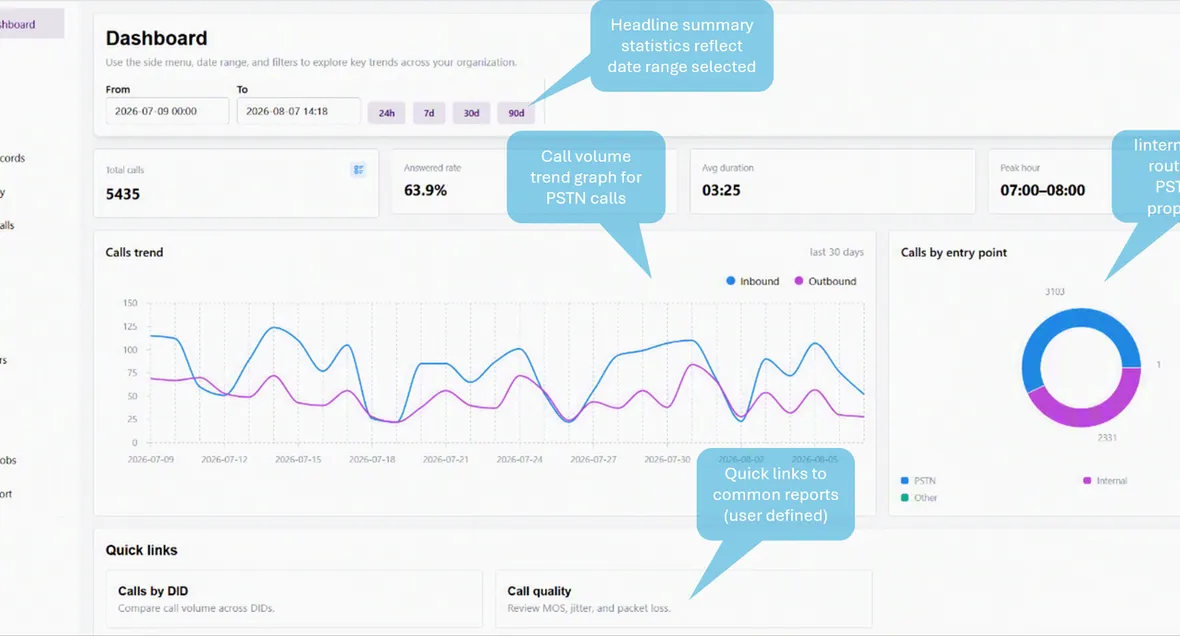
Get a deep view of your organization’s communications. Iristel Smart Manager Analytics turns raw call data, voice traffic, and user activity into real-time insights you can act on. It helps you optimize operations, improve customer service, and control communication costs.
Real-Time Dashboards
Monitor call volumes, queue wait times, and active sessions as they happen.
Cost & Usage Tracking
Spot peak traffic patterns, track usage by department, and cut needless spending.
Quality Assurance & Performance
Get a clear view of missed calls, customer response times, and how fast your team responds.
Unified Reporting
Get custom, automated reports sent straight to your inbox on your schedule.
Key Feature 01
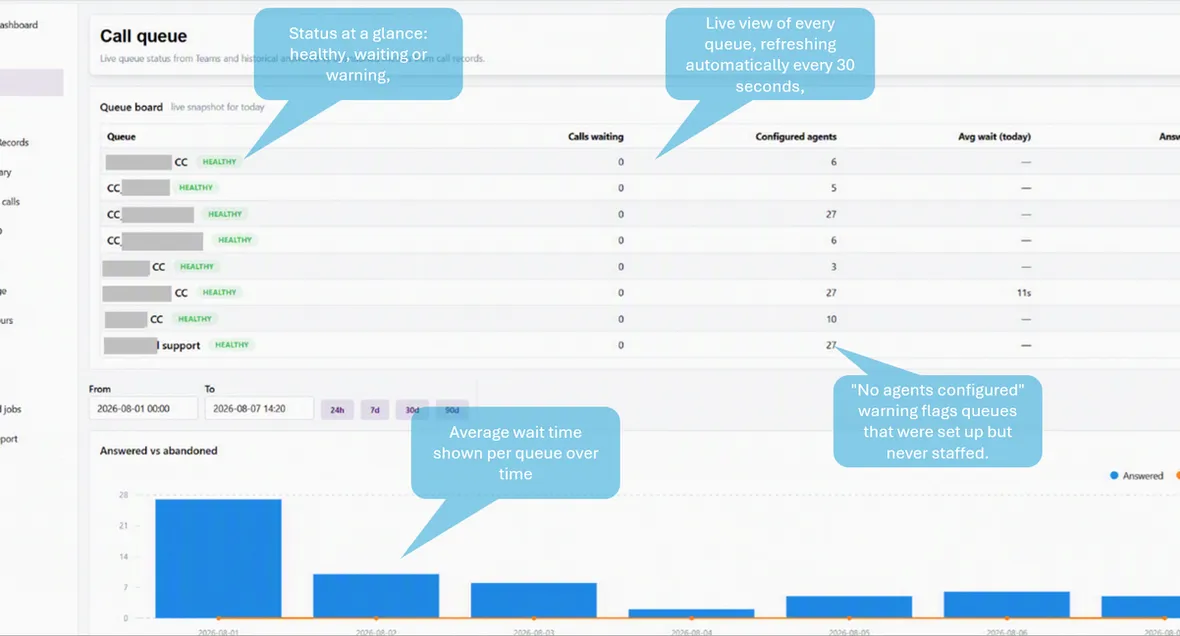
Advanced Call & Traffic Monitoring
Get a complete operational view across all your locations and extensions.
- Track inbound, outbound, and internal call metrics.
- Monitor peak call hours to staff your team effectively.
- Measure answer ratios, abandonment rates, and average call durations.
Key Feature 02
Operational Efficiency & Staff Productivity
Make data-driven decisions that enhance customer experience.
- Identify high-volume departments and phone lines.
- Analyze response times and call resolution speeds.
- View individual extension activity and group queue performance.
Key Feature 03
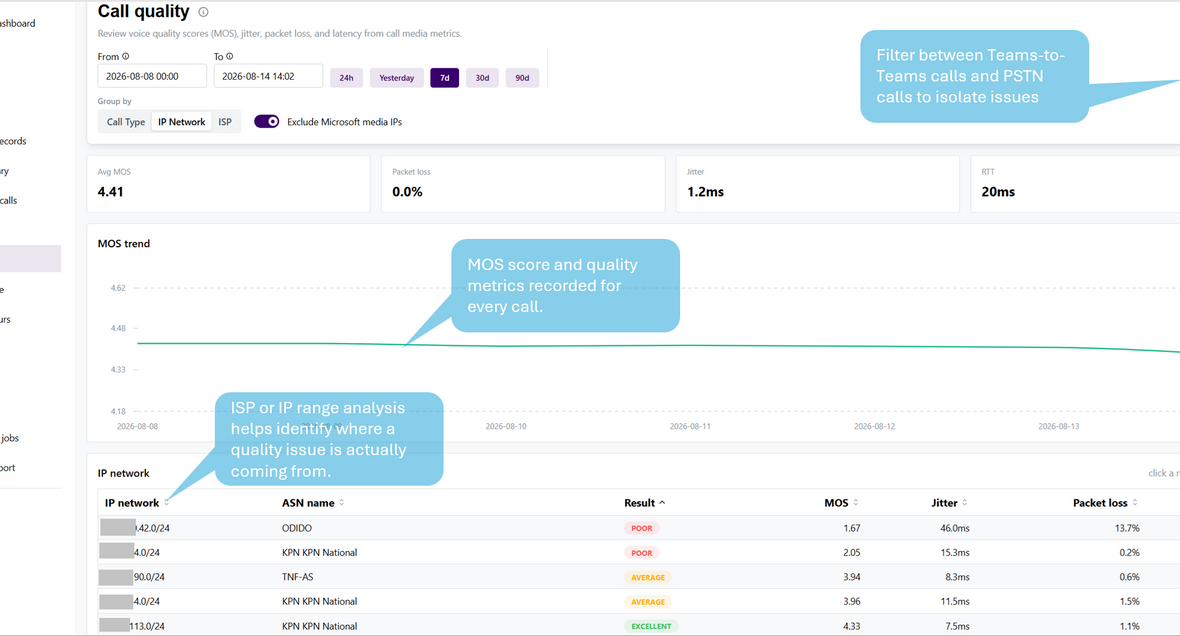
Voice Quality & Network Insights
Ensure your team always sounds professional with proactive quality checks.
- Monitor network performance metrics including jitter, latency, and packet loss.
- Identify underlying network or hardware issues causing poor call quality.
- Pinpoint problem areas quickly to maintain high-definition audio across your network.
Key Feature 04
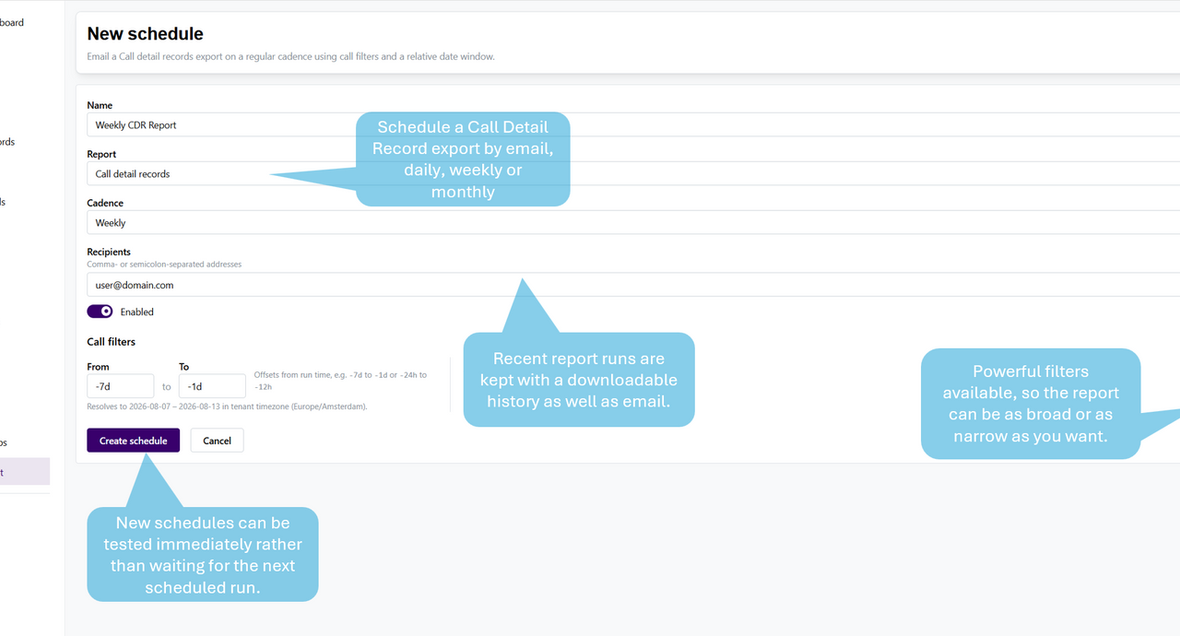
Custom & Scheduled Reporting
Set up reports tailored to your key performance indicators (KPIs).
- Build custom filter templates by department, branch, or date range.
- Schedule daily, weekly, or monthly automated PDF or CSV reports for management.
- Export clean data seamlessly for internal auditing and compliance.
Simple, Integrated Management
Smart Manager Analytics lives right inside your Iristel Smart Manager portal. There’s no separate software to install, no third-party logins to remember, and zero complex setup required.
New for December 2026
What’s New in Smart Manager
Smart Manager keeps adding tools for the work you do every day. These updates make it easier to see how calls reach each person, manage the accounts behind your call flows, and plan for the hours your team is away.
See Each User’s Call Flow
The call flow visualizer now shows a single user’s call flow, not just auto attendants. It makes it easier to understand users who have several numbers or use call delegation.
Manage Resource Accounts
A new page under Call Flows lists every resource account in your tenant. These are the accounts Teams uses for auto attendants and call queues. Create, edit and remove them, check licence status, and manage their phone numbers and policies, for both Microsoft and third-party apps.
Break Hours in Call Flows
Call flows now support break hours. A site that closes for lunch can send callers to a different flow instead of reusing its after-hours one.
New in Smart Manager Analytics
Included with the Operator Connect + Analytics plan.
Sort and Export Any Table
Every summary page can now be sorted and exported, exactly as it appears on screen.
Filter by Call Outcome
Filter calls by answered, missed, voicemail, dialled and connected, or dialled and not connected.
Report by Business Hours
Define business hours with up to four breaks a day, then filter any report by in-hours or after-hours calls.
Simplify Day-to-Day Administration
Centralized User and Number Management
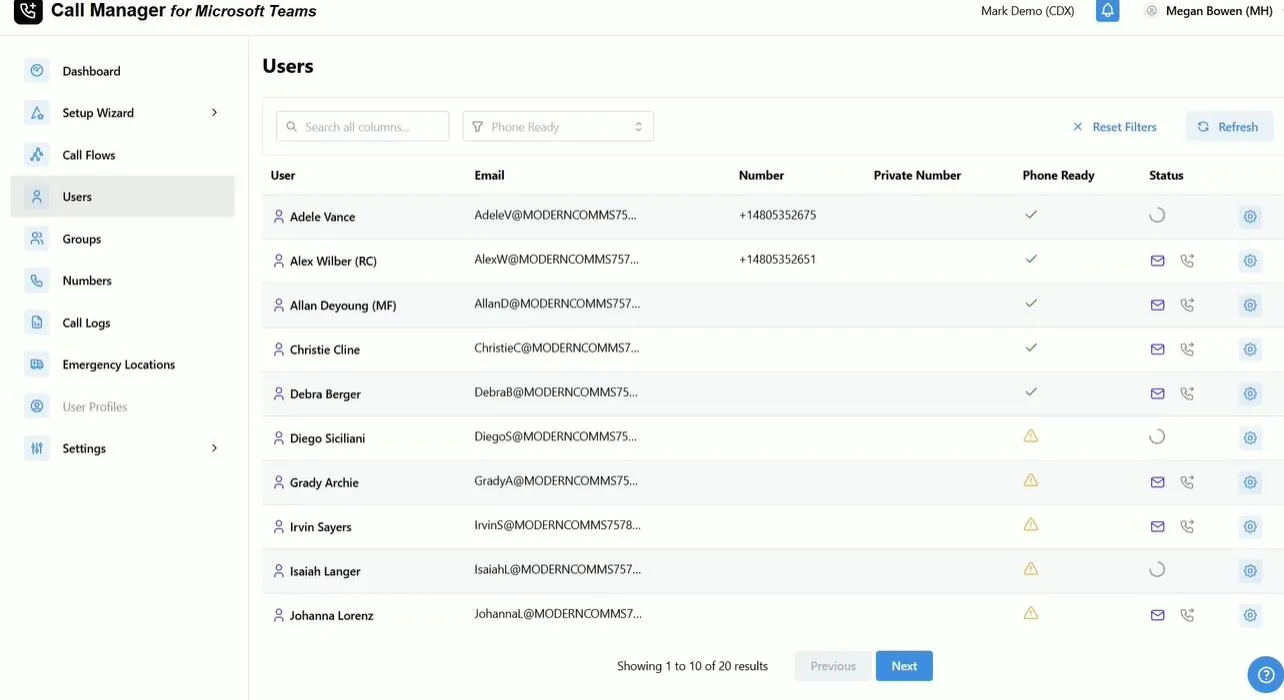
Running Teams Phone often means moving between several Microsoft portals and doing the same setup tasks again and again. Smart Manager brings it all together. From one easy-to-use interface, you can quickly view user status, assign and manage phone numbers, and set up calling features. You can also track licensing and maintain calling services across the whole organization.
Users and Numbers
Onboard and offboard users, assign and manage phone numbers, and manage groups and departments.
Features and Licensing
Set up calling features. See licences and track readiness across the organization.
Call Routing
Manage auto attendants and call queues, and oversee Teams Phone across the organization.
Gain Greater Visibility
Reporting, Diagnostics and Secure Remote Management
Get reports, diagnostics, and system insights from one central dashboard. Track how the system performs, review call activity, and quickly spot issues that need attention before they affect users.
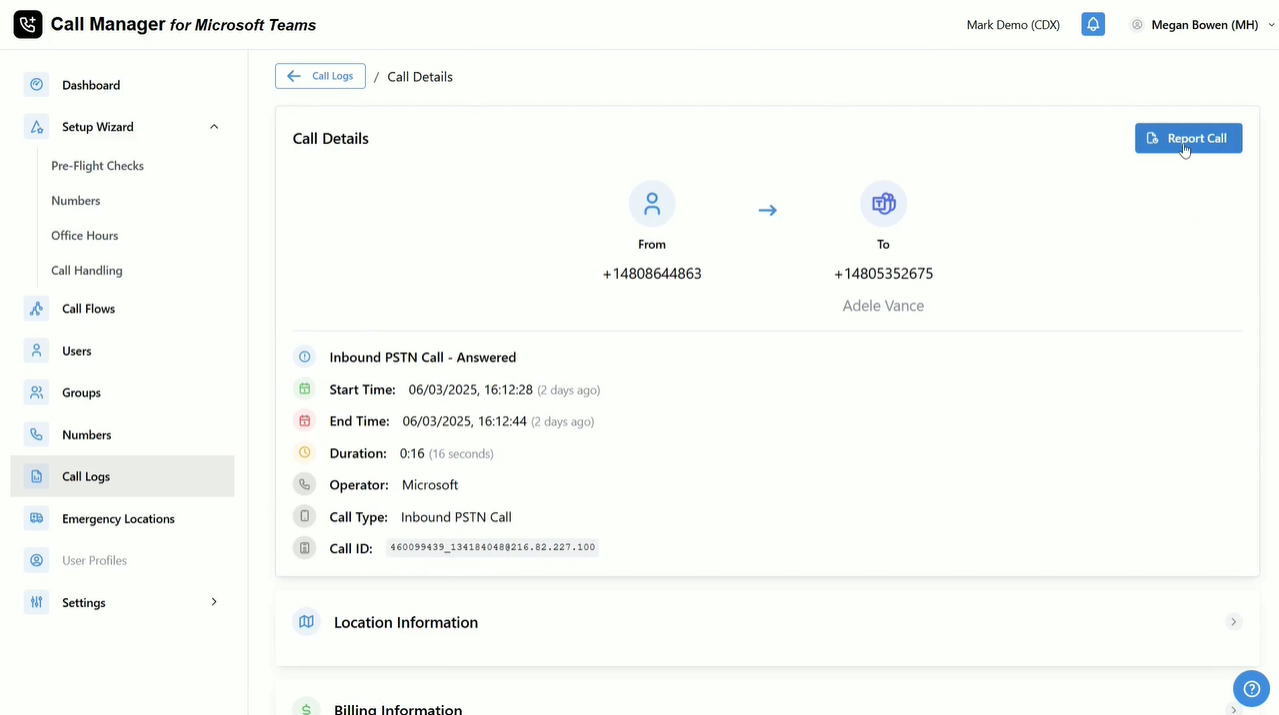
Reporting and Diagnostics
- Review detailed call information
- Investigate issues faster
- Support users and maintain service quality
Secure Remote Management
- No full Microsoft 365 tenant access required
- Access limited to Teams Phone configurations only
- Protects customer privacy
Enterprise Security
- Secure role-based access controls
- Microsoft Azure-hosted infrastructure
- Enterprise-grade security and compliance
Built for Providers
- Multi-tenant management
- Remote manage-on-behalf-of capabilities
- White-label branding options
What You Get
Everything You Need to Run Teams Phone
Connectivity
Provision through Operator Connect right in the Teams Admin Center. Get a 1:1 connection through Microsoft Azure Peering Services. Calls to Canada and the continental US are included, and there's no SBC or hardware to manage.
Deployment and Administration
Use a guided Teams Phone setup wizard. Manage users, numbers, auto attendants, and call queues, and get reporting and diagnostics. Direct Routing and Microsoft Calling Plans are supported too.
Service Providers
Manage multiple tenants with secure delegated admin. You can also manage remotely on a customer's behalf and add white-label branding.